
The SPRCHRGR Verify App uses two distinct authorization roles to give you flexibility in how approval authority is distributed across your team. Understanding the difference between Primary Approvers and Delegate Approvers helps you build an efficient workflow that balances oversight, expertise, and operational speed.
Primary Approvers serve as your core approval team with full authority and automatic assignment. They have complete approve/deny capability, are automatically added to every new approval request created for your company, can manage who's assigned to individual requests by adding or removing other approvers, and receive all enabled notifications to stay informed. Primary Approvers are typically your executive team, financial officers, or key decision-makers who need visibility into all approval activity.
Delegate Approvers provide targeted, on-demand approval authority without the automatic assignment to every request. They can approve or deny any request they're assigned to, but they're only added to specific requests when a Primary Approver brings them in. Delegate Approvers cannot add or remove other approvers from requests—this ensures Primary Approvers maintain control over who participates in each approval workflow. This role is perfect for specialists, part-time staff, or team members whose expertise is needed selectively rather than universally.
Approver Authorization Roles can be assigned when managing team member access and roles.
Primary Approver
- Full approve/deny capability
- Automatically added as an authorized approver to every new request created
- May assign or remove additional approvers to individual requests
- Receives all notifications (if enabled)
Delegate Approver
- Can be assigned to individual requests as an authorized approver by primary approvers.
- Will not be added to new approval requests by default.
- Not able to add/remove approvers assigned to individual requests.
When to use Delegate Approvers
Common scenarios where Delegate Approvers are ideal include:
-
Subject Matter Experts – Team members with specialized knowledge in specific areas (legal, IT, HR, compliance) who should only review requests related to their domain rather than all company approvals.
-
Part-Time or Seasonal Staff – Team members who work limited hours or are only available during certain periods and shouldn't be automatically assigned to every request that comes through.
-
Department-Specific Reviewers – Personnel who need approval authority only for requests affecting their department or cost center, such as a marketing manager reviewing advertising expenses or an operations lead approving equipment purchases.
-
Temporary Coverage – Team members filling in during another approver's absence (vacation, leave, transition periods) who need approval authority for a limited time without permanent assignment to all future requests.
-
Project-Based Involvement – Consultants, contractors, or team members involved in specific projects who should review approvals related only to those initiatives.
Adding a Delegate to a Pending Request
- Access the pending Approval Request in question. For details on how to access specific approval requests please refer to our article on Receiving and Reviewing Approval Requests.
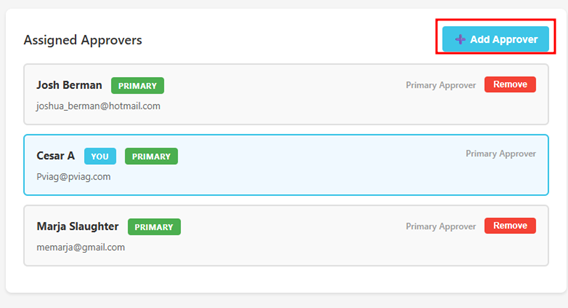
- Once opened, under Assigned Approvers, click Add Approver
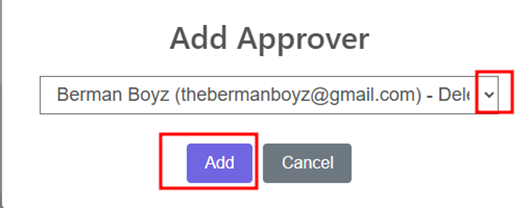
- Select the Delegated Approver and Add
- After being assigned, the delegate will be notified that they have been added to a new pending approval request and be able to approve or deny that pending request.
Questions? Contact Us